
Payment Options
Use the payment portal below to pay your debtor notice or statement.
Have your card ready and your reference number - found at the bottom left of your notice (highlighted below in red).
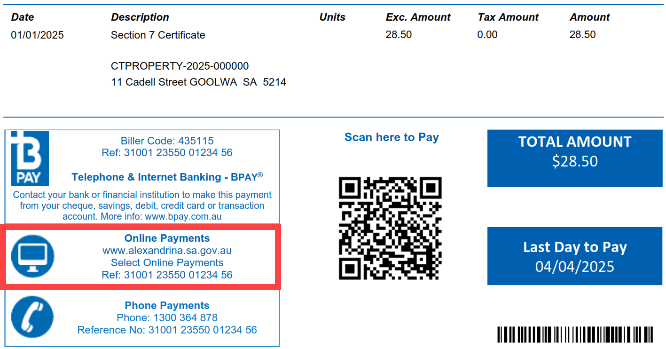
How to use the Payment Portal
1. To open the portal, click Pay Now above or scan the QR code on your notice
2. Enter your reference number then click Next (skip this step if you scanned the QR Code)
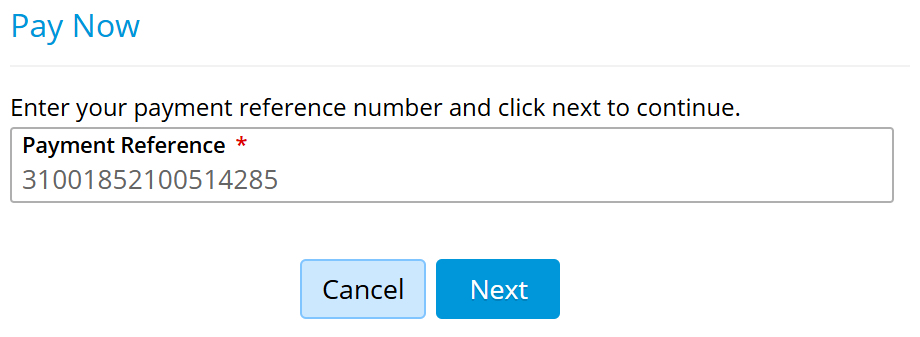
3. Click Pay Now on the line item

4. Enter an email address to send the receipt to
5. Complete payment
Change of payment details for debtor notice and statement payments, commencing from 20 January 2025
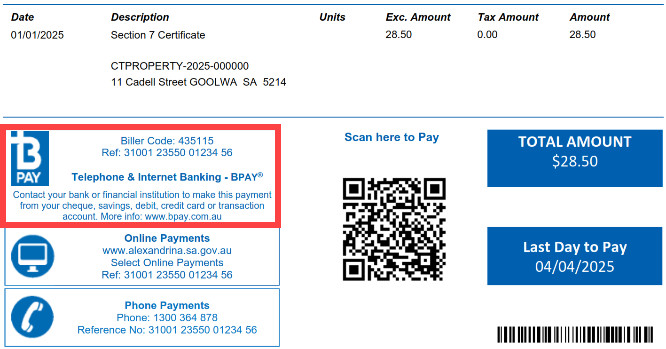
Please note, Council has a new Biller Code and new Payment Reference Number for BPAY payments.
To ensure your payment is received to your correct debtor account, please review the payment options details on your debtor notice or statement.
If you use BPAY to pay, please update any scheduled payments with the new Biller Code and Payment Reference Number located on the bottom left of your notice or statement.
Phone
Contact the number listed on your notice for 24/7 payment assistance.
In Person
Visit the Goolwa or Strathalbyn Council Office to pay. You can pay by EFTPOS, credit card or cheque.
Cheque
Attach your cheque to your notice and post to:
Alexandrina Council
PO Box 21, Goolwa SA 5214
Australia Post Billpay
Phone: 131 816
Online: www.auspost.com.au
In person: At any Australia Post outlet